
Only accept tickets during set hours
Give a panel opening hours and decide what members are told outside them.
Support hours tell members when your team is around. Outside them, a panel can still open tickets with a warning, or refuse them. Each panel has its own hours. With support hours off, a panel takes tickets at any time.
Open the panel
Open your dashboard and pick your server. In the sidebar, under Tickets, click Ticket Panels, then click the panel.

Turn support hours on
Click the Availability tab under the page title.
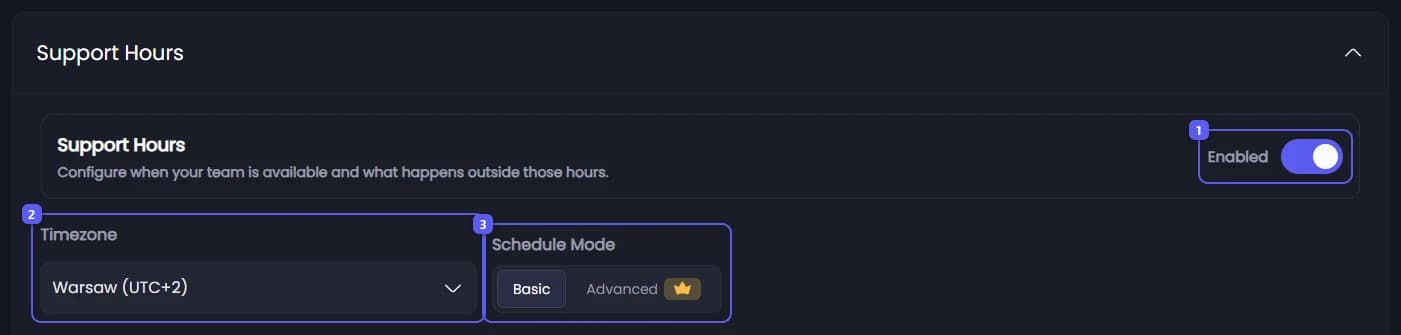
- Under Support Hours, turn on Enabled. The schedule below it becomes editable.
- Open Timezone and pick yours. Do this before you set any times: a time you enter is read in the zone picked at that moment. The timezone itself is not saved. Next time the page shows your own device's zone again, and your hours are shown in it.
- Under Schedule Mode, keep Basic: one opening and closing time per day. Advanced 👑 lets you set every hour of the week on a grid.
Set each day
In Basic mode each day has a row. Its switch decides if the day is open at all: a day switched off shows Closed. For an open day, pick Open, Reduced Support or Emergency Only, then set the start and end time. The start must be before the end.
Decide what happens outside the hours
Under Closed State Logic, pick one:
- Allow with Warning: the ticket opens, and a message inside it says replies may be slow. Its pings go out without a notification. This is the default.
- Deny Creation 👑: members cannot open a ticket until the hours start again. They see your closed hours message instead.
Write the messages
Under Message Configuration, the tabs Closed Hours, Reduced Support and Emergency Only hold the message for each state. Edit the ones you use.
Save
Press Save Changes in the bar at the bottom of the page. The next ticket follows the new hours.
Two more options sit below: Disable Staff Pings 👑 stops the support and admin role pings while support is not open, and Support Hours Bypass Roles 👑 lets chosen roles open tickets at any time.
It did not work?
Features marked with a crown (👑) need a Premium Subscription.