
Change how ticket channels are named
Pick a naming preset, or write your own format with placeholders.
Every ticket channel gets a name when it opens. Each panel picks its own naming pattern. A new name only applies to tickets opened after you save.
Open the panel
Open your dashboard and pick your server. In the sidebar, under Tickets, click Ticket Panels, then click the panel.

Pick a name pattern
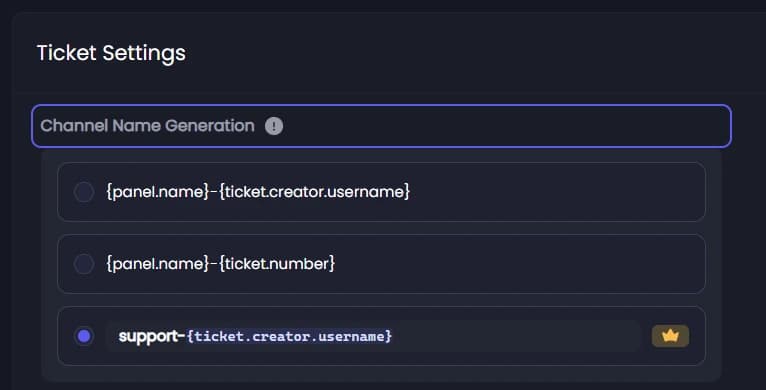
On the General tab, scroll to Ticket Settings. Under Channel Name Generation, pick one of the two free patterns:
{panel.name}-{ticket.creator.username}: the panel name and the member's username. This is the default.{panel.name}-{ticket.number}: the panel name and the ticket number. The number counts tickets across your whole server, not per panel.
The words in curly brackets are placeholders: Tickety swaps them for the real value when the ticket opens.
Or write your own 👑
The third choice is a box to write your own pattern, up to 100 characters. Type { to pick from the placeholders you can use, such as {ticket.creator.displayName} or {currentTime}.
Save
Press Save Changes in the bar at the bottom of the page.
It did not work?
Features marked with a crown (👑) need a Premium Subscription.