
Let staff claim tickets
Turn on claiming and decide what happens to everyone else's access.
Claiming lets one staff member take a ticket as theirs, so two people do not answer the same member. They press Claim on the ticket's welcome message, or use /ticket claim. Each panel decides whether claiming is on and what it does to the rest of the team.
Open the panel
Open your dashboard and pick your server. In the sidebar, under Tickets, click Ticket Panels, then click the panel.

Turn claiming on and pick what it does
On the General tab, scroll to Ticket Settings.
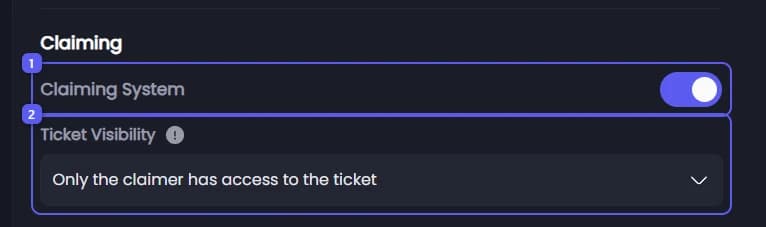
- Under Claiming, make sure Claiming System is on. It is on to start with.
- Open Ticket Visibility and pick what happens to the others once someone claims a ticket:
- Support Team keeps full access to the ticket: nothing changes for anyone.
- Only the claimer has access to the ticket: support roles and the admin role are removed from the ticket. This is the default.
- Support Team can view the ticket but not write in it: support roles and the admin role can still read, but not write.
When the ticket is unclaimed, everyone gets full access back. In a panel using Threading Mode, this setting does nothing: threads cannot change access.
Save
Press Save Changes in the bar at the bottom of the page. Visibility applies to the next claim, even on tickets that are already open.
The Claim button also has its own switch, on the Messages tab. See Change the close, claim and request close buttons.
Limit how many tickets one staff member can claim
This limit is for the whole server and counts open tickets from every panel together.
- In the sidebar, under Tickets, click Configuration, then click General Settings.
- Under General Settings, set Max Claimed Tickets per Staff Member: how many open tickets one staff member can have claimed at the same time. It starts at 0, no limit. The most you can save is 100.
- Press Save Changes in the bar at the bottom of the page.
A staff member at the limit must close or unclaim one of their tickets before they can claim another. The limit applies to the Claim button, /ticket claim and the Claim button on the dashboard's ticket management page. An automation that claims a ticket for someone at the limit skips that step.