
Tickets
Restrict who can open a ticket
Require a role, block a role, or turn away brand new accounts.
Each panel can decide who may open a ticket on it. These rules work as soon as you save, and the panel does not need posting again. A member who is refused gets a message only they can see, saying why.
Open the panel
Open your dashboard and pick your server. In the sidebar, under Tickets, click Ticket Panels, then click the panel.

Require or block roles
On the General tab, scroll to Ticket Settings.
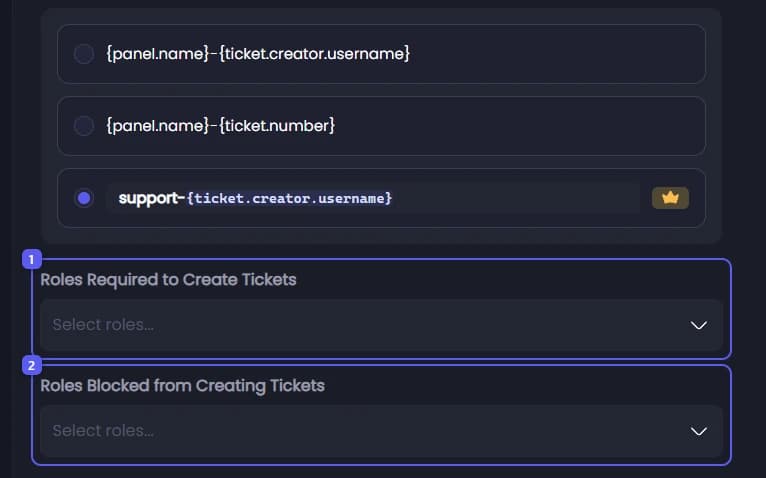
- Open Roles Required to Create Tickets and pick the roles a member must have. Leave it empty to let everyone in. Once you pick two or more roles, a line appears under it: Members must have Any or All of the selected roles. Any is picked to start with.
- Open Roles Blocked from Creating Tickets and pick roles that may never open a ticket here. A blocked role wins, even over a required role.
Turn away new accounts and new members
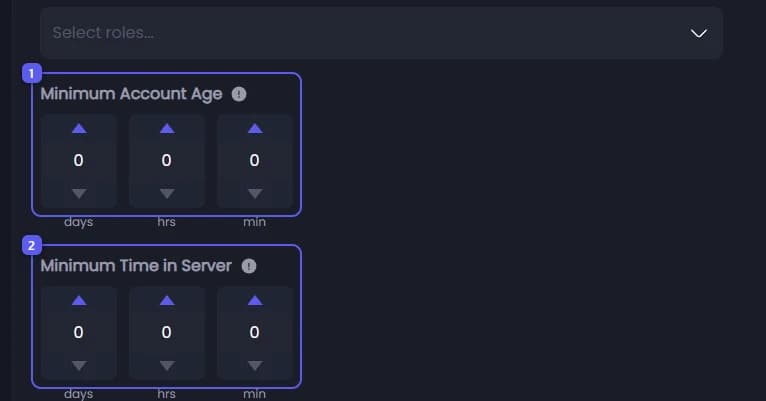
- Under Minimum Account Age, set how old a Discord account must be, in days, hours and minutes. This stops throwaway accounts made minutes ago. Leave it all at 0 to turn it off. The most you can set is 730 days.
- Under Minimum Time in Server, set how long someone must have been in your server. An old account that joined a minute ago is refused. Leave it all at 0 to turn it off.
Save
Press Save Changes in the bar at the bottom of the page.
What refused members see
| Title | Why |
|---|---|
| Required Roles | They lack the required roles. The message lists every required role, even in Any mode. |
| Blocked Role | They have a role from Roles Blocked from Creating Tickets. |
| Account Too New | Their Discord account is younger than Minimum Account Age. The message says when they will be allowed. |
| Too New Here | They joined more recently than Minimum Time in Server. The message says when they will be allowed. |