
Tighten verification against alts and bots
Require an older account, an avatar, and raise the web risk checks.
Once verification is set up (see Set up verification), you can make it harder for throwaway accounts to get through. An alt is a second account someone makes to get around a ban or to cheat.
Open Verification
Open your dashboard and pick your server. In the sidebar, under Verification, click Configuration.
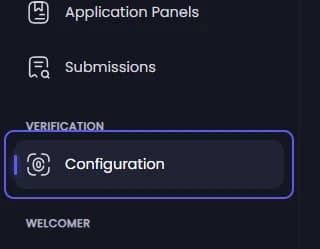
Require an older account and a profile picture
Under General Settings:
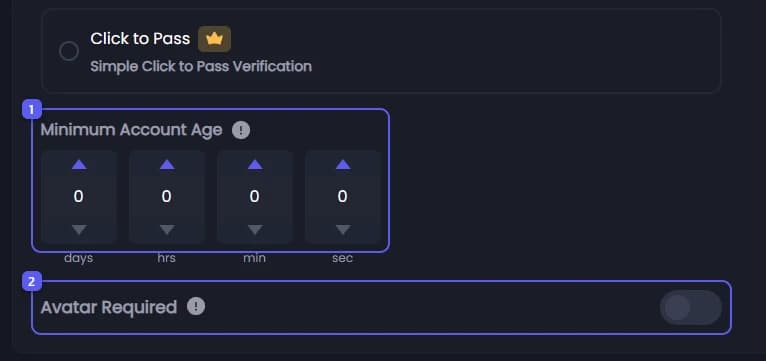
- Set Minimum Account Age in days, hours, minutes and seconds. Discord accounts younger than this cannot start verifying. Leave it all at 0 to turn it off.
- Turn on Avatar Required. Members with Discord's default picture cannot verify until they set their own.
Open the web checks 👑
Under Verification Method, press Settings on the Web Verification card. The Web Security window opens. Its checks only run with Web Verification picked.

Turn the checks on
Under Core Policy, turn on Enable Advanced Web Features.
Pick block or watch
Under Enforcement mode, pick Enforce (Allow/Block) to stop risky attempts, or Monitor (Log only) to let them through and only log them. Monitor is a safe way to try settings first.
Set how strict it is
Move Threat threshold. Each attempt gets a risk score from 0 to 100, and a score at or above the threshold is blocked, or flagged in Monitor mode. It starts at 70.
Block what you never want
The switches below block an attempt outright, before any score: Block Identity-Hiding Browsers, Block Developer Tools, Block Incognito Mode and Block VPN / Proxy / Tor. Blocked countries blocks attempts from the countries you pick.
These are strict. A real member in an incognito window, or on a VPN, is blocked too.
Pick a scoring preset
Under Threat Score Builder, press Recommended, Protective or Relaxed. Each sets how many points every warning sign adds. You can move each slider yourself afterwards.
Close the window, then save
Press Save & Close at the bottom of the window, then Save Changes in the bar at the bottom of the page. The window alone does not save.
What members see
| Message | Why |
|---|---|
| Account Too New | Their account is younger than Minimum Account Age. |
| Profile Picture Required | Avatar Required is on and they have the default picture. |
| Verification Blocked | The web checks blocked the attempt. They press Verify in your server again to retry. |
It did not work?
Features marked with a crown (👑) need a Premium Subscription.