🎉 Tickety V3 has now been released! Read more →
Server

Honeypot

Catch spam bots and compromised accounts with a bait channel nobody is meant to post in, and decide what happens to whoever does.

A honeypot is a channel your members are told never to write in. Spam bots and stolen accounts sweep every channel they can see, drop their link and move on, so a channel whose only purpose is to be posted in catches them on their first message. There is no keyword list to keep current and no false positive to apologise for: the rule is "do not post here", and the only way to trip it is to break it.

Free servers get the whole trap. One bait channel, the warning, the direct message, every action and the log. Premium adds more bait channels, the blocklist escalation and quoting the offending message.

Setting one up

Run the configurator

In Discord, run /configurator and pick Honeypot from the menu at the bottom of the message.

Add a bait channel

Press Add a channel. Pick a channel you already have, or type a name and Tickety creates one at the top of your server.

The notice goes up in it straight away and the trap is armed.

There is no /honeypot setup command. Everything on this page is either in /configurator or on the dashboard, so the honeypot is set up the same way every other Tickety feature is.

The rest of the settings live on your Dashboard under Server → Honeypot, and the configurator page links straight to them.

Bait channels

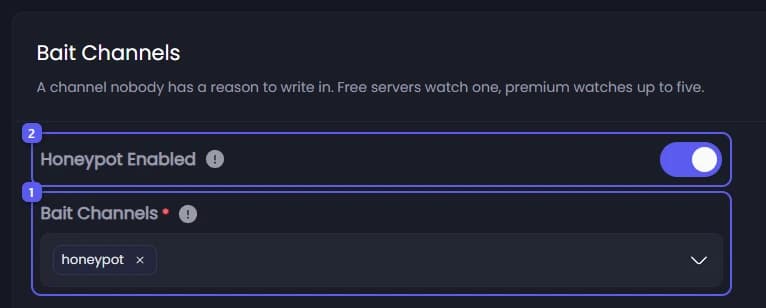
  • Honeypot enabled - Arms every bait channel below. Turning it off changes nothing else: the channels, the messages and the counters all stay exactly as they are.
  • Bait channels - The channels Tickety watches. Free servers watch one, premium watches up to five.

A channel that carries a real conversation is never a candidate. Make an empty one instead. On premium, add a voice channel as well: some bots go for the lowest voice channel before they touch anything else.

The bait channel is created with no permission overwrites on purpose. A trap members cannot post in never trips, so the bait has to be as writable as any other channel. What protects your members is the notice inside it, not a locked door.

Camouflage

Two daily jobs that stop a bait channel reading as one. Both are off until you turn them on.

  • Keep the channel active - Once a day Tickety posts a silent message in each bait channel and deletes it straight away. Nobody is notified and nothing is left behind, but the channel stops showing a last message date from months ago, which is one of the signals a scraper uses to skip it.
  • Rename the channel daily - Renames your bait channels once a day, picking from a list of ordinary names like archive, resources and old-chat. Members see the name change, so leave it off if the channel's name matters to you. Tickety needs Manage Channels for this.

What happens

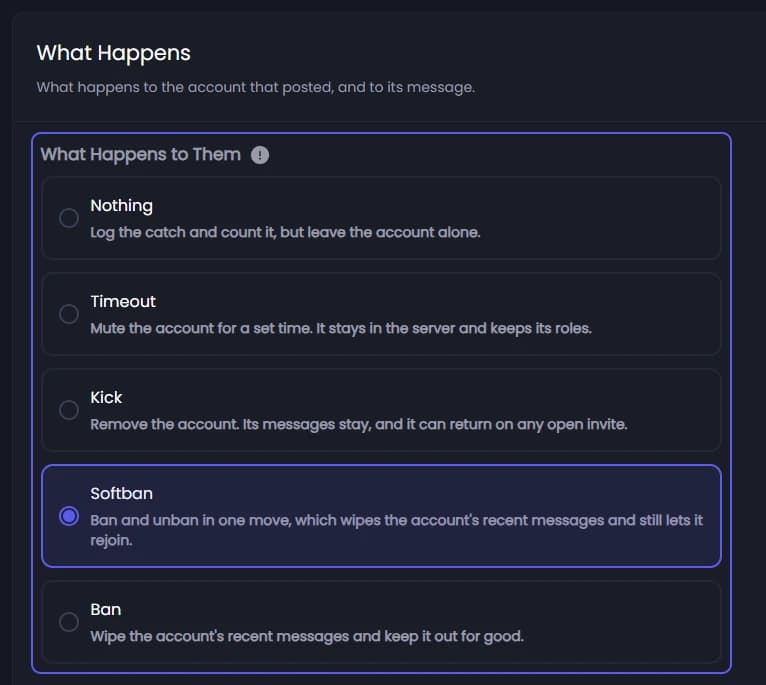
  • What happens to them - Warn, timeout, kick, softban or ban. A softban removes the account and lifts the ban immediately, which clears their recent messages without keeping them out.
  • Time them out first - Mutes the account a moment before it is removed. Discord keeps a timeout on somebody who leaves and comes back, so a softbanned account that rejoins on the invite in its message is still muted when it lands. Needs Moderate Members.
  • Messages to wipe - How much of the account's recent history a ban or softban purges.
  • Audit log reason - What Discord's audit log records against the action.
  • Delete the message that tripped it - Takes the bait message down as well.

Tickety needs its own role above the caught account's highest role, plus Ban Members for a ban or softban and Kick Members for a kick. Without either, the trip is logged as a failure and the account stays. The log entry says which of the two it was, because Discord reports both the same way.

Who is exempt

  • Exempt administrators - Covers the server owner and anyone holding a role with Administrator. Tickety cannot act on most of them anyway, so leaving this on is what turns a failure into a clean exemption in the log.
  • Exempt roles - Members holding any of these are never acted on, administrator or not. This is for the roles that should be safe without handing out Administrator to get there.

An exempt member still trips the trap and still counts on the counter. That is deliberate: those are exactly the trips worth noticing.

The warning message

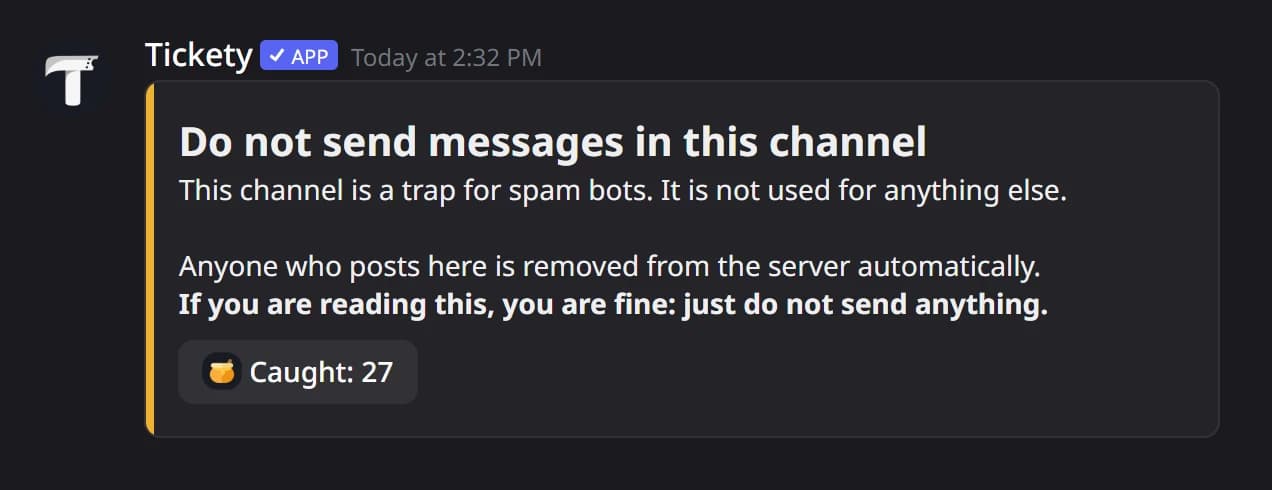
The notice posted in every bait channel, so a member who wanders in knows to leave it alone.

  • Post the warning - Turning this off leaves the trap armed and silent, which catches a bot just as well but leaves your members nothing to read.
  • Counter button - The number on the button under the warning. It counts every trip, exempt and failed ones included. Show the count for the whole server, for that channel, or hide the button entirely. {count} still works in the text either way.

The warning ships as a Components V2 layout rather than an embed, and this is the one place in Tickety where that layout is free. Every server posts the shipped arrangement, whatever plan it is on. Writing your own words is free too, through the Embeds mode of the editor. Rearranging the blocks is what premium buys.

👑

Premium servers can move, add and remove the blocks in both honeypot messages. A server whose subscription lapses keeps its layout stored, untouched, and posts the shipped one until it comes back.

The direct message

What the caught account is told, sent just before the action lands.

  • Send a direct message - A closed inbox never stops the action. Tickety gives the message a short budget, then carries on either way.
  • Offer a way back in - Adds a rejoin button carrying a permanent invite, so a member whose account was compromised can come back once they have cleaned it up. Tickety creates the invite the first time one is needed.

The message always carries a link to the account recovery guide and a line saying replies reach nobody, because a direct message from a bot the reader has never spoken to owes them both. Those lines are Tickety's and cannot be edited away.

Escalation and logging

  • Add them to the blacklist 👑 - A caught account is also blocked from the Tickety features you pick, so it cannot open a ticket or enter a giveaway if it ever gets back in. Entries show up under Blacklists like any other, with a length you choose.
  • Quote the message 👑 - Puts the text that tripped the trap in the log entry. It is raid content, so it lands in the log channel and nowhere else.
  • Log channel - Where each trip is written down: who posted, what happened to them, and whether it worked. A failure is logged here too, which is how you find out Tickety's role sits too low.

Reading the counter

Three places show what the trap has caught:

WhereWhat it shows
The button under the noticeAny member can press it. Caught, tripped, exempt and failed for this server, plus the product wide total
/honeypot statsThe same card, for somebody who is not standing in the bait channel
AnalyticsThe Honeypot tab, with the per action breakdown and the history

The card names no accounts. Who was caught belongs in the log channel, where only your staff can read it.

Switching the honeypot off keeps every bait channel and every catch count. "Off" and "never set up" are different states, and only one of them should cost you your history.

On this page